TAX RETURN INSTRUCTIONS
1. REVIEW YOUR TAX RETURN
Log in to your Client Portal through our website. The taxpayer is responsible for auditing his/her own tax return. Clients should utilize our Post Appointment Tax Return Checklist as a guide. We are not liable for any penalties and/or interest accrued on a tax return signed off by our clients.
a. Log into your client portal at www.richardcolins.com.
b. Go to "Documents" TAB, "Folder view", "Tax Return", "TAX YEAR".
c. Go to "Client Documents".
d. Go to "US (TAX YEAR) Archive Tax Return" and "CA (TAX YEAR) Archive Tax Return".
2. eSign VERIFICATION
Check email inbox for link to IRS and state(s) eSign identity verification. If you are Married Filing Jointly, both you and your spouse will need to verify through your respective emails. Non-negotiable. THE LINK EXPIRES AFTER 48 HOURS. If the link expires or you have failed the identity security questions offered by the IRS, you will need to print the documents and sign them instead. Esignature link can only be sent to you two times before you MUST paper sign your documents.
Electronically sign these forms (ACCESS EXPIRES AFTER 48 HRS):
a. Federal 8879
b. California State 8879
c. Other state(s) that apply to you
d. Bank Verification (if applicable)
***There are no state income tax returns for states: Alaska, Florida, Nevada, South Dakota, Texas, Washington, and Wyoming
If you are receiving a notification to add an Accountant password use the LAST 4 DIGITS of your SSN. If that doesn't register, you will need to wet sign your tax return documents. Follow the instructions below to wet sign your documents:
WET SIGN INSTRUCTIONS
1. Log into your client portal by going to our website www.richardcolins.com.
2. Go to Documents > Tax Return > Tax Year > Client Documents > "US Tax Return Action Required" and "CA Tax Return Action Required" PDFs.
3. Print out all "Action Required" PDFs with the forms Federal 8879, California State 8879, Bank Verification, and any other state(s) that apply to you.
4. Sign all required documents with a black or blue pen. Both spouses need to sign if Married Filing Jointly.
5. Upload the signed documents as a PDF back into your Client Portal: go to Documents TAB > list view > add. They need to be crisp, clear, and as if you just printed it out from your own printer. All four edges need to be aligned with the frame of the screen with nothing cut off. PDF cannot be taken from an angle.
6. Email us when you have it completed.
3. IRS PAYMENT INSTRUCTIONS - IMPORTANT READ BEFORE MOVING ON TO STEP 4
We DO NOT automatically withdraw balance payments for our clients unless:
1. it is less than $1,000; or
2. if specifically instructed by client
*Reason: common errors on release of funds by the banks causing IRS and State penalties on taxpayers. **These are bank errors and out of our control.
Pay online for a confirmation of payment receipt. Confirmation of receipts are never issued via auto withdrawal by the IRS or State tax agencies, therefore we do not offer that particular service in your best interest. You want the receipt in case a payment ever goes wrong. Links to making payments in the next step.
NOTE 1:
When you make your payments, the balance due may still show ZERO. Pay your total balance due amount anyway as reported on your tax return. Balance may show ZERO because it takes a couple of weeks for the returns to be fully processed after being accepted. You are still responsible to pay the balance due by the deadline to avoid any penalties even though your tax return may not have been fully processed by the IRS or the state.
NOTE 2:
If you are Married Filing Jointly, you MUST ABSOLUTELY make the online payment to the IRS/ state accounts under the "Taxpayer" (not "Spouse") listed in your tax returns. If payment is made under Spouse's SSN, you may need to call the IRS/ FTB to let them know to log your payment successfully.
FINAL STEPS TO COMPLETE YOUR TAX RETURN
Review your tax return - Where to find it.
eSignatures - How to electronically sign your tax return.
Wet Signature - How to print and sign if eSign fails.
Paying the IRS and State - Links and concise instructions provided.
RAAP - RC Audit Assurance Policy Add-On Optional
Invoice - Where to find balance due for services rendered.
Payment Options - Forms of payment we accept.
All steps must be completed before we can eFile your return.
4. PAY ONLINE (*Do not send a check)
STEP 1: FEDERAL - INTERNAL REVENUE SERVICE
Visit the IRS Website: www.irs.gov/payments
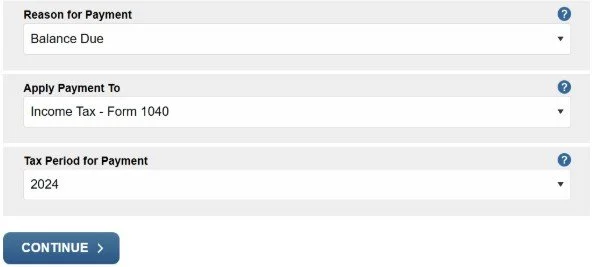
Reason for Payment - choose "BALANCE DUE" or "AMENDED RETURN" respectively
Apply Payment to - choose "Income Tax - Form 1040"
Tax Period for Payment - choose the current tax year you are the making payment for.
*Verify your identity when making a payment to the IRS:
Use a PREVIOUS TAX RETURN YEAR and NOT the current tax return year you are filing. If you use the current tax return year of filing, you will not be found in the IRS database since the return has not been filed yet.
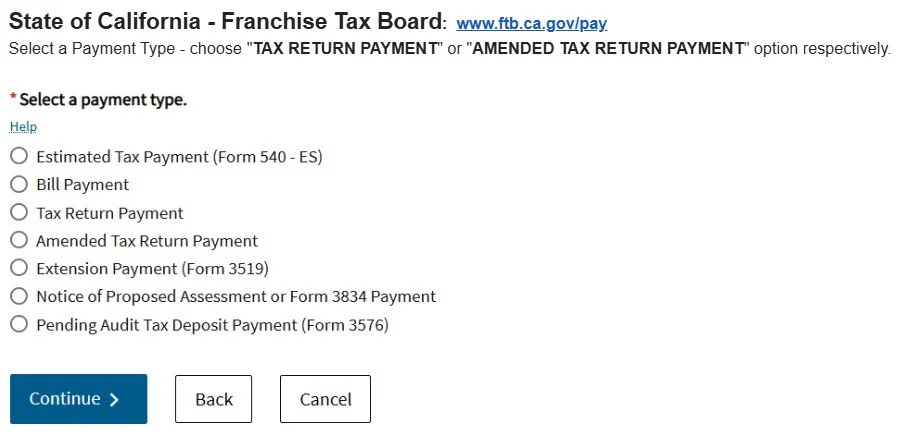
STEP 2: STATE OF CALIFORNIA - Franchise Tax Board: www.ftb.ca.gov/pay
Select a Payment Type - choose "TAX RETURN PAYMENT" or "AMENDED TAX RETURN PAYMENT" option respectively.
Other States: If other state balances are owed, visit respective websites to make payments.
5. IRS/FTB PROTECTION - RC AUDIT ASSURANCE POLICY "RAAP" (optional add-on)
WHAT DOES IT COVER?
See how we protect your tax return filings against the IRS at 'RAAP'.
No questions asked regardless if the audit is at the fault of the taxpayer. Terms and Conditions apply.
6. INVOICE & PAYMENT OPTIONS
View your invoice on a computer, not on a mobile device; the mobile version will not display the "US 2024 Tax Return Action Required". When you are on the Client Portal via Computer, hover over the documents to view the entire document title.
a. Log into your client portal at www.richardcolins.com.
b. Go to "Documents" TAB, "Folder view", "Tax Return", "TAX YEAR"
c. Go to "Client Documents".
d. Go to the PDF labeled "US (TAX YEAR) Tax Return Action Required".
e. Invoice is on page 2 or page 4
See Terms & Conditions. We limit the number of follow-up communications to a maximum of two follow-up correspondences. Clients have until 10 business days after the initial invoice is sent to pay the balance in full for services completely rendered that were not previously retained on a contract; after 10 business days it is considered a late payment and will incur an additional charge of 1% interest per month and collection fees.
CLOSE OUT YOUR INVOICE
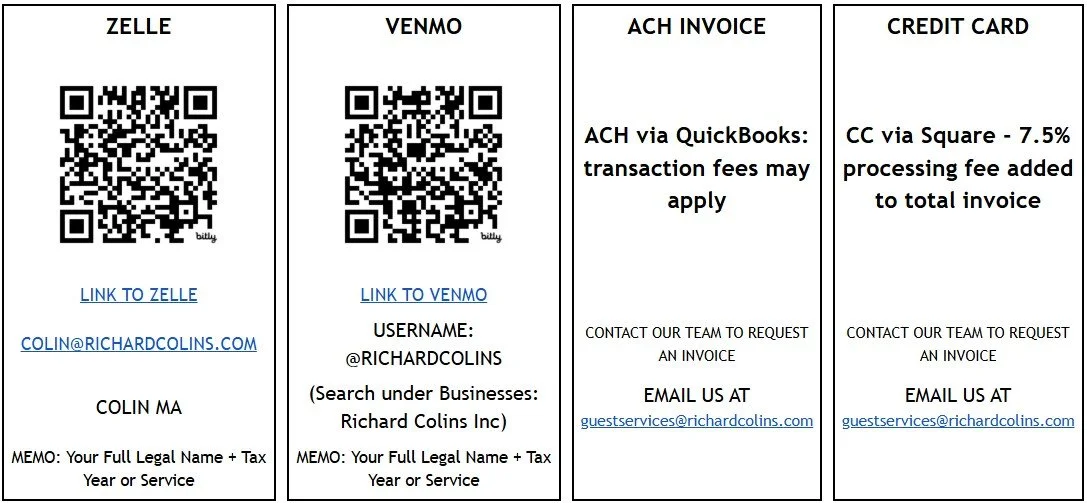
*We do not accept checks.