TAX FILING PROCESS
STEP ONE:
New Client: Schedule a 15-30 minute complimentary assessment call so we can best understand your needs.
Returning Client: Gather your documents to be uploaded.
STEP TWO:
Download a copy of the Document Checklist & Expense sheet that best pertains to you.
1. DOWNLOAD THE CHECKLIST THAT BEST PERTAINS TO YOU:
Document Checklist for Individuals
Download and make sure all documents marked from the checklist are uploaded.
Document Checklist for Business
Download and make sure all documents marked from the checklist are uploaded.
Post Appointment Tax Return Checklist
Download and review before signing your tax return.
Refer to ‘Tax Filing Accuracy’ on our Terms & Conditions.
2. DOWNLOAD THE EXPENSE SPREADSHEET THAT BEST PERTAINS TO YOU:
Select the expense spreadsheet that best suits your needs. Download the file, save it to your device, enter your data, and then upload it to your Client Portal.
Expense Spreadsheet for Individuals
Expense Spreadsheet for Self-Employed
Expense Spreadsheet for Rental Properties
Note: We do not have spreadsheets for Corporations.
STEP THREE:
Complete the Tax Questionnaire for the current tax filing tax year located in your Client Portal. You will be able to upload your documents via this process. Your Tax Questionnaire can be found in the “TASKS” tab, this is where you will upload all relevant documents to your current tax filing year.
If it does not appear or is unavailable, please email us at guestservices@richardcolins.com for support.
Make sure all documents marked from your Document Checklist are uploaded
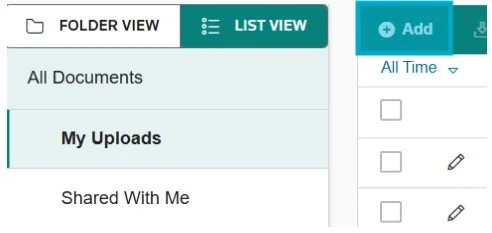
If you are having trouble uploading your documents to the Tax Questionnaire upload your documents by logging in to your Client Portal > DOCUMENTS Tab > List View > + Add
Make it stand out
This is located in the DOCUMENTS tab in your Client Portal.
For all documents except the Expense Spreadsheets - Accepting PDFs Only: Our licensed software provided by Thomson Reuters is only compatible with PDFs. JPEGs and MAC files don’t load well; we cannot utilize the provided tools for it.
For Expense Spreadsheets - Accepting Excel only. PDFs, MAC spreadsheets - Numbers and JPEGs do not function for reconciliation.
STEP FOUR:
Relabel all of your documents accordingly by following the Document Checklist we provided. Review Step 3 in our Upload Instructions for instructions on how to properly relabel your documents. Be sure all documents are labeled correctly before scheduling your appointment.
Make it stand out
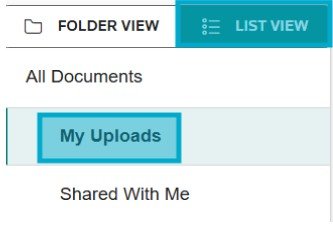
After logging into your client portal at www.richardcolins.com, go to "DOCUMENTS" TAB, click on "LIST VIEW" next to FOLDER VIEW in the left menu bar, select "My Uploads",
Make it stand out
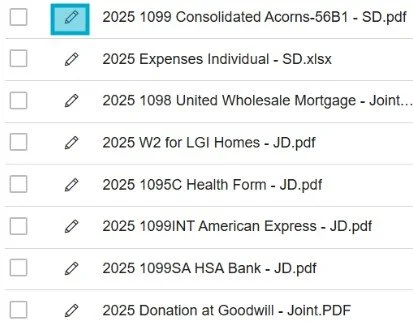
then click on the "pencil" icon next to your document to rename each file.
STEP FIVE:
Once all required documents have been uploaded and properly labeled, you may schedule your appointment here:
All appointments take place via phone call. We have a strict cancellation policy well defined in all our initial correspondences with our clients upon the booking. All documents are to be uploaded prior to the scheduling of the appointment.
During Tax Season (January - April 15): Your tax professional will reach out to you via phone call during your scheduled appointment time.
During Off Season (April 15 - December): The calendar selection is only a placeholder that allows our team to begin reviewing and preparing your uploaded documents. It is not an appointment. Once your documents have been fully prepared, a team member will contact you to schedule an official appointment for discussion and adjustments with one of our professionals.
STEP SIX:
After your review call with your tax professional, you will need to fully review your tax return before signing off. This step is essential to ensure that all information is accurate and complete.
Use our Post-Appointment Tax Return Checklist to go through common items taxpayers often overlook. This helps reduce errors and ensures you fully understand the contents of your return before authorizing e-filing.
STEP SEVEN:
Once you have completed your review, follow the Tax Return Instructions sent to you via email. These instructions will guide you on how to finalize your return, electronically sign required documents, and submit your payment.
Please pay your invoice using any of our accepted forms of payment below:
-
colin@richardcolins.com
Name: Colin Ma
Memo: ‘Your Full Tax Legal Name’ + ‘Tax Year Return or Service’ -
Username: @richardcolins
Search businesses: Richard Colins Inc.
Memo: ‘Full Legal Tax Return Name’ + ‘Tax Return Year or Service’ -
Request by replying to the instructional email our team sent to you.
-
Email guestservices@richardcolins.com to request credit card payment processing.
7.5% process and handling fee added to your total invoice
-
Thank you for taking your time to complete all these steps! We know the process may seem tedious but we assure you that it is for your benefit, making sure we claim every credit, take every deduction, and maximize all the available tax advantages you deserve. You will surely see the ROI from the processes we continue to invest into and refine year to year as we continue to work together. We look forward to our call!